Bring bookings, work history, and billing together. Unify household profiles, reservations, visit and contact histories, and invoice downloads—so your back office runs smoothly with fewer handoff gaps and missed follow-ups. Household billing supports credit card payments via Stripe API integration as well as invoice payment by bank transfer.
We offer a demo environment with sample data. When signing up, select "I want to try the features (use demo environment with sample data)" to get access to the demo.
We will explain anne's features and onboarding process online. Please feel free to contact us.
anne [an-neh] (安音, pronounced "an-neh") is a back-office SaaS for babysitting and housekeeping service providers. It centralizes customer (household) profiles, bookings, work (visit) history, contact history, invoice downloads, and master data (branches, service types), making handoffs and daily coordination smoother.
Keep customers, bookings, and histories in one place to reduce dependence on specific individuals.
List and calendar views plus traceable histories help teams avoid overlaps and follow up reliably.
Role-based permissions and two-factor authentication help protect operational data.
Bookings, calendars, and visit histories provide an at-a-glance view of operations.
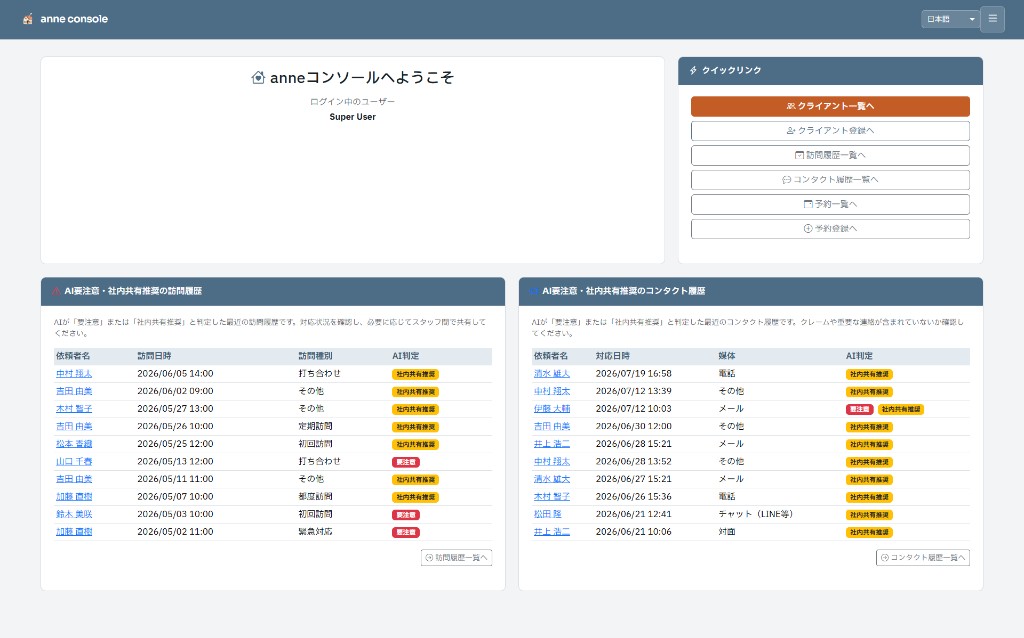
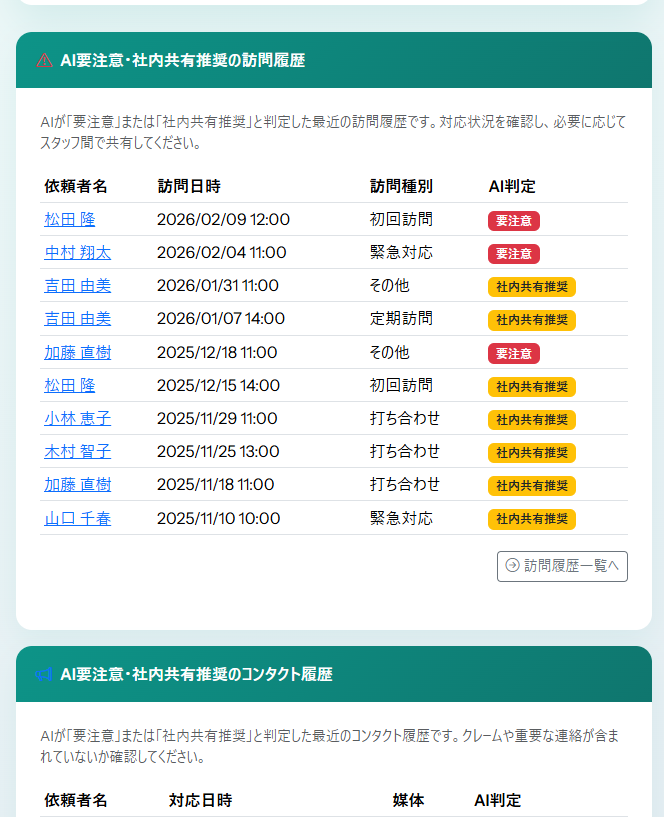
AI flags “needs attention” and “recommended for internal sharing” to help surface important handoffs and complaints.
Branch and service-type masters reduce inconsistency and improve operational quality.
Review visit-history and contact-history lists side by side to spot gaps faster and prioritize follow-up.
Household profiles are linked to bookings and histories, reducing time spent searching.
Visit and contact histories help staff respond consistently even when assignees change.
AI staff suggestions provide a first pass for assignment decisions.
From household profiles to bookings, work history, and contact history—everything stays connected. Calendar views help prevent overlaps, and AI staff suggestions can reduce the workload of assignment decisions.
As branches and staff grow, booking coordination and handoffs become harder. anne standardizes operations with branch/service-type masters and centralized bookings and histories. Paid customization (custom quote) is also available when needed.
When reliable handoffs and traceable context matter, visit and contact histories help teams understand what happened and respond consistently as an organization.
Control what each staff member can see and do, based on their role.
Operational data is never used for AI training.
We protect important operational data and reduce risk through secure storage.
Two-factor authentication (TOTP) is supported. Trusted devices can also be used to reduce login friction.
Measures such as lockouts on repeated failures help reduce unauthorized access risk.
Centralize customers, bookings, and histories to streamline daily operations.
Start by registering household profiles, contacts, and requests. This becomes the hub for bookings and histories.
Register staff accounts, then set up branches and service types (babysitting/housekeeping). This reduces inconsistency and standardizes operations.
Create bookings and review them in both list and calendar views. Plan daily and weekly workload and make adjustments as needed.
Run AI staff suggestions from a booking to get candidate assignees. Use it as a starting point for assignment decisions.
Record visit history and contact history for traceability. Download invoices for a period to streamline billing work.
Export municipality/guardian/internal visit reports in PDF or Word from each visit history and use them for submission and internal sharing.
In daily operations, repeat Steps 1–3 to manage customers and bookings. Use Step 4 when you want AI suggestions, keep traceable context in Step 5, and use Step 6 to export reports when needed.
Start with the standard plan, and add customization (custom quote) as needed.
All amounts shown are tax-inclusive.
| Feature | Standard Plan All core features |
|---|---|
| Initial Setup Fee | ¥68,750 (JPY) |
| Base Fee | ¥57,750 (JPY) / month The first month and the cancellation month are charged on a prorated basis. |
| Consultation History Usage Fee Per consultation record registered in the chargeable period (on or after contract start). Multiple records per client are charged per record (e.g. 3 records for one client = 3× fee). |
300円 → 150円 / record / month
p(m)=max(150, 300 - 0.750×m)
Free tier: First 100 consultation records/month free
|
| Staff Limit | Unlimited |
| Domain | Random subdomain |
| Payment Method | Invoice only |
| Setup Time | Usually within 7 business days |
| Support | Email only |
Billing is in Japanese Yen only.
We provide paid customization to match your operations.
We proceed with requirements → quote → development. Cost and timeline vary depending on scope.
Examples
How to request:
Please contact us via the contact form.
Contact UsWe provide a server environment dedicated to your company. (This option is offered as a cloud service; on-premises deployment is not available.)
With exclusive use of CPU and memory, you can maintain maximum performance for heavy data processing and concurrent access without being affected by other tenants. Custom domain bring-your-own and IP address restrictions are also available.
Price:From ¥20,000 (JPY) / month
Included in this option:
How to apply:
Please contact us via the contact form.
Contact UsOur specialists will handle data migration from data exported from your existing systems or from Excel files used in your organization.
We safely migrate client information and consultation history into the current schema, including data cleaning, field mapping, and validation. Since effort varies greatly depending on data volume and source system structure, pricing is provided as a custom quote.
Price:Custom quote
Typical scope of this option:
How to apply:
Please contact us via the contact form.
Contact UsFree for 2 weeks from setup completion date (no charges)
The plan has a base fee of ¥57,750 (JPY) per month (tax included). Consultation records are free up to 100 per month; from 101 onward, the unit price decreases smoothly as records increase (with a floor of 150 JPY per record).
Unit price reference: from 101 it starts at 300 JPY, then p(m)=max(150, 300 - 0.750×m). The first and last months are prorated by the number of days in use.
You can scroll horizontally by swiping within the table. Team plan, 30-day estimate.
| Consultation records registered | Monthly Fee |
|---|---|
| 0–100 | ¥57,750 (JPY) |
| 150 | ¥71,793 (JPY) |
| 200 | ¥83,962 (JPY) |
| 250 | ¥94,256 (JPY) |
| 300 | ¥102,675 (JPY) |
| 350 | ¥110,175 (JPY) |
| 400 | ¥117,675 (JPY) |
| 450 | ¥125,175 (JPY) |
| 500 | ¥132,675 (JPY) |
| 550 | ¥140,175 (JPY) |
| 600 | ¥147,675 (JPY) |
Q. Why is there an initial setup fee of ¥68,750 (JPY) (tax included)?
A. It covers the setup work to build a dedicated tenant environment for your organization (including domain and security configuration). We also share important notes online and provide initial onboarding support (1–2 sessions).
Q. How are fees calculated if I start or terminate in the middle of a month?
A. The basic usage fee is prorated based on the number of days you actually use the service in that month, using the monthly fee of ¥57,750 (JPY) divided by the number of days in the month (timezone fixed to Japan Standard Time, JST). Consultation history usage fees are calculated based on the number of consultation records registered during the chargeable period.
Centralize profiles, contacts, and requests
Record and share service execution details
Search and filter history lists to find context quickly
Attach images/PDFs to histories as evidence records
Record time segments, child allocation, transport/expenses
Export municipality/guardian/internal reports in PDF/Word
Suggest staff candidates for each booking
View schedules in list and calendar formats
2FA, trusted devices, role-based access
Export invoices in bulk for a period
Manage household payments via Stripe API integration
Accounts, roles, permissions, assignments
Japanese, English, Spanish
AI highlights items to watch or share internally
Log calls/emails and find past context quickly
AI summarizes visit/contact histories at a glance
Maintain branch/master data for consistent operations
Manage household profiles, contacts, and service preferences in one place. By keeping bookings and histories connected to the same customer record, handoffs and internal coordination become smoother.
Record service execution by date/time, assignee, and content. Quick access to past context helps prevent issues and standardize service quality across the team.
Manage visit and contact histories in dedicated list views and quickly access required records through search and filtering. This helps teams monitor daily operations and reduce oversights.
Attach image/PDF/Word/Excel files to visit and contact histories. Keep evidence with each record for easier audits and internal reviews.
Add detailed time segments, child-based allocation, and charge lines (including transport/expenses) to each visit history. This improves subsidy handling and pre-billing checks.
For each visit history, export municipality, guardian-facing, and internal reports. Choose PDF or Word according to submission and sharing needs.
The system suggests staff candidates based on the booking details. This reduces manual back-and-forth and speeds up assignment decisions.
Manage bookings in both list and calendar views. Keeping schedules visible helps prevent overlaps and missed assignments.
Protect operational data with role-based permissions and multi-factor authentication. Staff can access only what they need, based on their role.
Download invoices by customer for a specified period. Reduce manual billing work and prevent mistakes.
For household invoices, anne supports Stripe-based credit card payments via API integration. Customers complete card registration from the portal, and operators can run single or batch charges from the admin console. Payment results are automatically reflected in invoice records so unpaid, paid, and failed statuses are managed in one place. Households that do not use cards can still pay by invoice and bank transfer.
Register staff accounts (babysitters, housekeeping staff, etc.) and assign roles and permissions suitable for your operation.
Support for 3 languages: Japanese, English, and Spanish. Handle clients from diverse backgrounds and support counseling work in international environments.
AI flags work/contact histories as “needs attention” or “recommended for internal sharing” so important handovers and complaints are less likely to be missed.
Keep a history of calls/emails and other communications with customers. Even when assignees change, it is easy to understand past context.
AI summarizes work (visit) history and contact history so staff can grasp the overall situation quickly. Useful for handoffs and prioritizing follow-ups.
Manage branch/master data to standardize operational units. Combined with staff and booking management, it supports building a reliable service delivery structure.
Smooth start from registration to environment setup
Apply via the form (invoice payment only)
Your dedicated environment will be set up usually within 7 business days after registration
You can start using immediately after environment setup
The following rate limits are set for Gemini AI communication
Per counselor
Per counselor
These limits are set for stable Gemini API operation and cost management. Sufficient for normal counseling work.
